

Workflows
One-line commands. A full engineering process.
Claude does the work. You hold the gates.
Every workflow runs inside a Pete playground, an agentic WordPress environment, with gates at the risky steps. And you’re not limited to these commands: run any prompt against a full copy of your production site, then push the result live one page at a time, without touching a plugin file. Every rule below was learned on a real migration.
/push_page
Dev → production · exactly one page · backed up before it writes
Ship a single page from your local playground to production or staging, without a full-site deploy. It copies the page’s content, title, status, template, and the media that page references, rewrites the dev domain to the live one, and transports everything over SSH. Deliberately narrow: never themes, plugins, options, menus, or other pages. Re-run it as often as you like; it updates in place, keyed by slug.
- Preflight
- Export
- Rewrite domains
- Back up target
- Push + media
- Verify
Rules learned the hard way
- Back up the target before any write: non-negotiable. It’s what makes the overwrite confirmation honest, and every push reversible with one command.
- Update in place, keyed by slug: re-running must be idempotent. Import-based approaches silently create
my-page-2instead of updating the page you meant. - Never import a WXR file: your dev site isn’t publicly reachable, so attachment fetching fails and you end up with duplicate slugs and broken media.
- Rewrite both URL schemes: dev is
http://, production ishttps://. Miss thehttp://variant and you ship mixed-content image URLs that browsers block. - Verify with a real request, never assume: the run isn’t done until the live URL returns 200 and actually contains the title and the pushed media.
- If the target renders unstyled, stop and say so: the page depends on a theme or patterns that don’t exist there. Pushing a theme is a separate, deliberate act, not a silent side effect.
Field-tested on: this site. The case study you can read here and the homepage that links to it were both pushed to production with /push_page, backed up, domain-rewritten, and curl-verified on the way in.

/retheme
Classic theme → block theme · local-only · ends at a verified .zip
Migrates a WordPress site off a legacy classic theme (Genesis, Divi, or hand-rolled PHP) onto a standalone Full-Site-Editing block theme: theme.json design tokens, block templates, and reusable patterns. The agent inventories the legacy theme, extracts your palette, fonts, and section structure, then rebuilds it as native blocks: not just the homepage, but every page your main menu links to, converted and verified one at a time in menu order.
- Inventory
- Design decisions
- Foundation build
- Page loop
- Final verify
- Package
Rules learned the hard way
- Menu-driven page loop, homepage first: the work list isn’t “the homepage”; it’s every page the active main menu links to, derived during inventory. Each page is converted and render-verified before the next begins, so a regression always points at the page just touched. The run ends with a per-page checklist: page → HTTP status → verified.
- Files, not database: every design decision lives in theme files, so the .zip carries the whole design.
- Purge page caches and prove the change: cache plugins will happily serve the old theme’s HTML after activation.
- Map assets to sections before composing: the image in the CSS isn’t always the hero art.
- Flow wrapper, constrained content: otherwise every full-width section silently boxes at content width.
- The legacy theme stays installed: inactive, as the “before” state and instant rollback.
Field-tested on: a Genesis golf-club site; this very website: the Divi homepage, key pages, and 29 more pieces of content you’re browsing right now; and an 11-page Divi WooCommerce store rebuilt page by page through the menu loop, live checkout included.
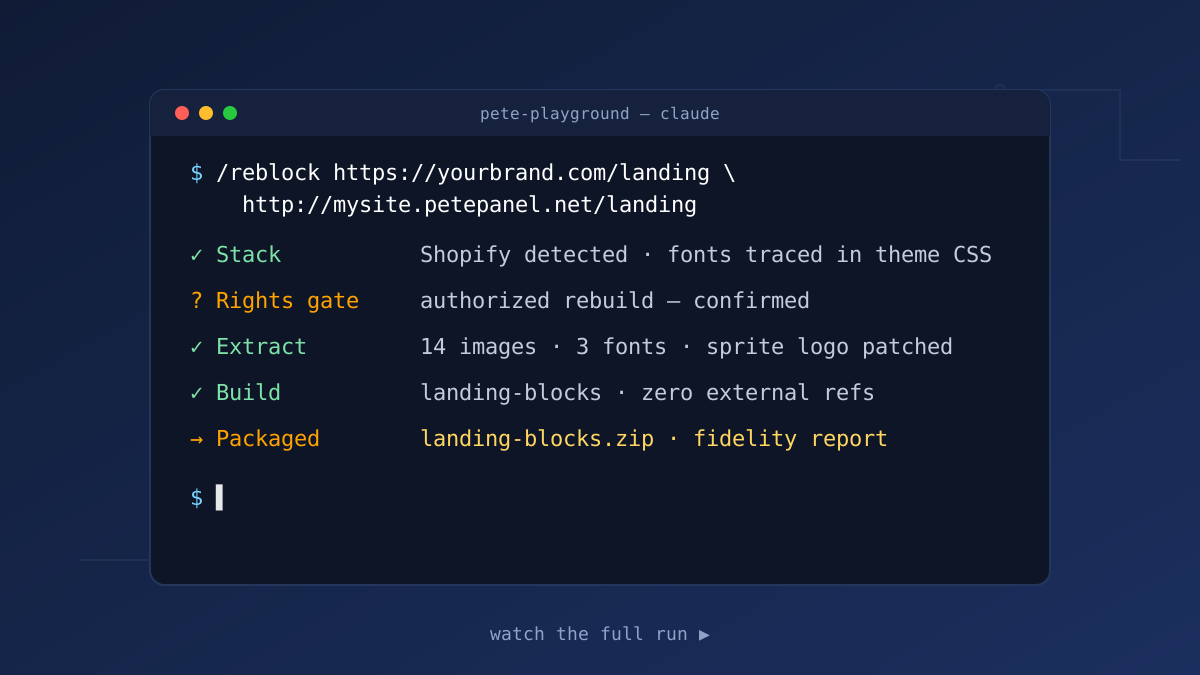
/reblock
Any page → block theme · rights-gated · stack-agnostic
Point it at a page on any stack (WordPress, Shopify, Webflow, headless) and it rebuilds the design as a self-contained block theme: bundled images, license-correct fonts, zero runtime references to the source. Before anything downloads, the rights gate asks one question: is this your property (faithful rebuild), or inspiration (an original design study with fresh branding, art, and copy)?
- Detect stack
- Rights gate
- Extract
- Build
- Verify
- Package
Rules learned the hard way
- Identify the source stack first: hashed bundles hide fonts; images may live on a separate origin entirely.
- Trace @font-face, never trust <link> tags: sites load unused font kits while self-hosting the real display face.
- Fonts by license: Google Fonts get bundled; commercial faces get an open substitute, documented.
- Match layout, not just content: header composition, sprite-sheet logos, CSS background images, spacing rhythm.
- Screenshots are the layout source of truth: text extraction misses what a picture shows instantly.
Field-tested on: Divi, Shopify, and headless-WP/Astro sources: three stacks, one repeatable process.
/plugin_audit
Any plugin → security report · read-only · source→sink traced
Point it at one plugin’s directory and it reads the PHP source, hunts the dangerous sinks, and traces each one from attacker-controlled input to where it lands, reporting only what it can state a real exploit path for, ranked by severity. Tuned for the WordPress vulnerability classes that produce actual CVEs: missing nonce or capability checks, SQL injection, XSS, file inclusion, SSRF, and auth bypass in AJAX/REST handlers. It reviews code; it never runs it, never touches the database, and never probes a live site.
- Scope
- Enumerate sinks
- Trace source→sink
- Verify
- Rank + report
Rules learned the hard way
- A grep hit is not a vulnerability: every candidate is traced from a real input source to the sink before it counts. A report full of unverified matches is worse than a short, accurate one.
- Credit the guards WordPress already gives you:
hash_equals,esc_*,$wpdb->prepare,current_user_can, the nonce family. Flagging correctly-guarded code destroys trust in the whole report. - Rank honestly: unauthenticated RCE or SQLi is Critical; a defense-in-depth nit is Info. Inflating severity to look thorough helps no one.
- Read-only, always: static source review. No executing the plugin, no writes, no probing the running endpoint, no exploit payloads.
- Never hide a coverage cap: skipped a vendored library or sampled a huge tree? The report says so. Silent truncation reads as “clean”.
Field-tested on: this site’s own code: a plugin read end to end, 1,161 lines across 7 files, that came back Low risk with a short list of honest, defense-in-depth hardening items instead of inflated scare findings.
/activate_redis_cache
Redis object cache · one production site · reversible
Activates the Redis object cache for a single WordPress site on a production or staging Pete Panel server: installs the redis-cache plugin, sets a site-unique key prefix so sites never collide in the shared Redis, enables the object-cache drop-in over SSH, and verifies the site still serves before reporting done.
- Preflight
- Install plugin
- Key prefix
- Enable drop-in
- Verify
Rules learned the hard way
- Site-unique key prefix: sites sharing one Redis without prefixes will happily serve each other’s cache.
- Back up wp-config before any write: every change ships with its exact rollback commands in the report.
- Verify the site serves after enabling: a broken drop-in fails quietly until the next real request.
/deactivate_redis_cache
Redis object cache · clean removal · one site
Deactivates Redis caching for one site without breaking it mid-request: removes the object-cache drop-in atomically, deactivates the redis-cache plugin, strips the WP_REDIS_* constants (with the FPM reload that change requires), and deletes only that site’s keys from the shared Redis.
- Preflight
- Remove drop-in
- Deactivate plugin
- Strip constants
- Purge keys
- Verify
Rules learned the hard way
- Remove the drop-in atomically: deleting it in place mid-request breaks every page until the next load.
- Strip the constants, then reload FPM: with OPcache timestamps off in production, the old config lives on until the reload.
- Purge only this site’s keys: the Redis is shared; a global flush punishes every other site on the server.
/run_benchmark
k6 load test · claimed vs measured · PASS/FAIL report
Puts the published benchmarks to the test on your own hardware: detects the server’s RAM and CPU over SSH, picks the matching tier from the published claims, adjusts for the load generator’s own bandwidth limits, then runs the k6 cached-visits test and reports a claimed-versus-measured PASS/FAIL table. The real-order checkout test is gated and opt-in.
- Detect hardware
- Pick tier
- Calibrate
- Load test
- Checkout (opt-in)
- Report
Rules learned the hard way
- Calibrate for the load generator first: a laptop’s bandwidth caps full-page tests long before the server does.
- Checkout tests never run by default: they place real orders, so they are gated and opt-in.
- Measure the tier you actually have: claims are per machine size; the report compares against the tier your hardware matches.
Field-tested on: the staging split-test behind the published numbers; it’s how the 8GB checkout figure went from estimate to measurement.
Need a workflow for your stack?
These are just the beginning: every migration teaches the next rule. Tell us what you’re moving.